Posts

Showing posts with the label DIY

DIY Fixing a Laptop Battery

Image
Hi Friends ,  DIY is always fun and awesome, and so welcome to another word of tech byte... This note is a collective scratchpad of troubleshoot methods and fixes i came across recently for fixing my laptop battery that went bad. Battery Model   : HP HS04  battery pack (4 cell , lithium ion, 14.6V , 2670 mAh, 41 Wh) Laptop  Model  : HP 15-ac635tu   (equivalent to HP G4 250 Notebook) The Symptoms Laptop Showed 1. Laptop charger goes on and off intermittently after charging up to more than 60% . The charger port LED goes between charging and not-charging frequently. 2. Once laptop is running from battery, charge percentage drops faster than normal, and once it reaches 23% , laptop shuts off immediately. On power in on again the charge percentage will be less than 15% and wont complete bootup to desktop. Faints instantly. Troubleshooting 1. Borrowed a laptop charger from my friend and tried 2 or 3 charge cycles. But still the issue...
Potentiometer to Web

Image
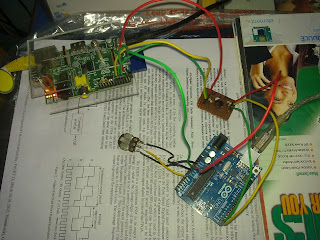
Hi all.. lets do another beautiful DIY... Goal  To read voltage from a potentiometer in real-time and display in a web page dynamically. So.. the goal seems completely dump and does no good job.But the learning curve involved will introduce into many Linux concepts, hardware setup, troubleshooting extents from micro-controller programs to html/php code. Steps 1. Continuously read from analog input of Arduino where potentiometer is connected. 2. Send the value to Raspberry Pi via UART port. 3. Raspberry Pi reads the data and appends and writes it into a file. 4. Make an Apache server run in Raspberry Pi. 5. A combination of simple html file, a php code, and ajax script together does the job of    updating the webpage with latest value from file. 6. Forward the raspberry server to internet and watch the realtime variation of pot value in webpage. Okie.. so lets get started... Hardware Setup.. Yep.. a Raspberry pi and Arduino UNO R3 connected over UART (s...

Bidirectional 3.3v 5v Level Shifter

Image
Hi guys.. welcome to another simple DIY project... Lets make a level shifter, which will just shift a 5v data line to 3.3v or vice versa... Okie why we need such a shifter..  ? or what is this stuff actually.... ? We run around huge bunch of devices that run in various voltage levels.. for example Raspberry Pi runs in 3.3v, and its all GPIO I/O pins are at this level, even though we provide a 5v USB input. And so it is not tolerent to 5V input levels from another device or sensor modules connected to it over I/O pins using SPI, UART, i2C... whatever.... Another example is Arduino UNO which runs in 5V, normally is driving all its I/O at 5V levels.  So interfacing boards at different I/O voltage levels requires a level shifter. Simple voltage divider circuits can help for an extent.. but they dont provide low voltage  device protection or bidirectional shifting. Wait a minute ... Bidirectional... what is it ? Okie.. some communication protocols like i2C are b...

Programming Cable for HAM Radios

Image
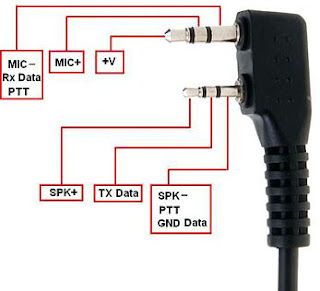
Hi all... this is about DIY programming cable.... for your HAM radio... Various  programming cables can be found in eBay at high prices. But the fact is that all these cables are UART - USB converters either in 3.3V or 5V TTL. Radios whether it be Icom, Yaseu, Baofeng, Motorola , all can be programmed with a single cable , once you know what are the connector pinouts... Here i am going to explain this with help of my Baofeng UV-5RE, which is a 5W VHF/UHF handheld radio. It has a 2.5mm and 3.5mm jack for connecting programming cable, headset+mic. Depending on what you connect, the radio responds to it... The ring, tip, sleeve on both jacks have various signal designations. So for this DIY programming cable , our point of interest are on 1. 3.5 mm sleeve   (Rx Data) 2. 2.5 mm ring      (Tx Data) 3. 2.5 mm sleeve  (GND Data) So what we need to have before starting.. 1. A modified nokia DKU-5 or CA-42 cable (USB-UART converter). See i...

USB-UART console using old nokia DKU-5 datacable. (3.3v TTL)

Image
Hi all.. lets do another beautiful DIY device... It will be a USB-UART dongle using Nokia Data Adapter DKU-5. What is it ??? A USB-UART dongle mimics a serial COM on PC. So... modern PCs lack DB-9 RS232 ports , but has plenty of USB ports. So there comes a lot of needs while you want to connect some boards ( Embedded linux boards, android TV boxes, Raspberry Pi, Beagle Board, FPGA kits, router/modem, HAM radio (ICOM/BAOFENG)  ) to your PC for low level debugging or programming. Since UART being the simplest of communications, all these board have a 3.3v or 5v TTL UART header to be hooked up... This header may consist of a Vcc,Tx,Rx,Gnd pins at one of above TTL voltages. So what we need to connect here is a UART- USB converter. Ebay can help you with cheap converters.. But it doesn't have the beauty of a DIY. So what i need ?? 1. Old DKU-5 nokia data adapter (CA-42 also works, but i had a DKU-5 only) 2. Some wires , soldering iron, strippers etc.. By luck CA-42...

Remote Control for PC..!!

Image
Do u watch lot of movies on your PC, ever thought of having a remote control so that you can sit far and enjoy the movies... read further Lot of IR receiver devices are available online for purchase.. But what is you are not able to spend thousands for them.. Here a simple Do It Yourself IR receiver is explained.. BASIC NEEDS 1. Some soldering skills 2. Few electronic components 3. Backpanel RS232 serial port or internal serial header on motherboard. 4. WinLIRC freeware  ( http://winlirc.sourceforge.net/ ) Almost all motherboards have serial ports on backpanel or Serial header on motherboard. In domestic uses these ports are never used..  So we use this port for the communication part. Use can use any remote at your household (TV, DVD player, TV tuner remotes etc.) HARDWARE PART 1. CIRCUIT DIAGRAM 2. EXPLANATION   Sensor SM0038 is a common purpose IR signal detector centered at std 38khz range. We provide a stable 5v supply to it using LM7805 ...

Real Time Clock IP Core

Image
A completely synthesizeable IP core of a Real Time Clock (RTC) is presented here. Specifications 1. Alarm Set capability 2. AM/PM notification 3. Last Alarm time memory Info HDL used  : VHDL Tested on an Altera DE2 FPGA deveopment board.see the screenshots. Download link to source VHDL files http://www.mediafire.com/?ud1bt4zl05y5v6s Bugs are always tricky.. so download, try , and report back if any exists.. But i am sure u will love to explore the code because.. it will teach u abt reading hardware pins, using it in digital logic.. driving 'LED 7 segments' and interacting with the design using push buttons and slide switches etc....

Save a external USB port from Bluetooth Dongle..!!!!

Image
Hey.. guys... Let us see another idea.. Simply it is to make your Desktop Bluetooth enabled without using any rear/front USB ports but still by using a cheap USB Bluetooth dongle.. Even somebody got the idea.. i guess.. the smell of a hot soldering iron.. Let us start.. Basics  Use the extra available USB internal headers on a motherboard (refer mobo manuals). Nowdays all mobos have plenty of such headers.. but rarely used by any user.. So... Ingrediants needed. 1. A female USB port.. (screw some friend of yours having a Pentium 2 or 3  PC. ) 2. Wire harness of old PC speaker and front pannel connector (u r again lucky to have such a friend). 3. A small lined PCB. (Cut it around with just 4 lines at a length of 2 cm.. ) 4. The usuals.. obviously the Iron, solder paste, solder lead etc... Design Methodology Solder the 4 wire harness on the 4 lines of PCB. Understand the board connectors from the skteches. Also understand the four copper contact...

TV out cable for Smart Phones

Image
Many phones have TV out facility but the cable does not come in standard packaging box. We have to buy it additional. It would cost hundreds for original cables I have made a TV out cable for my Nokia N79 long back. Same trick could be applied for other brands once you know the pinouts of 3.5mm jack correctly. All you need is 1) 3.5 mm HEADSET connector with 4 contacts. ( u can buy headsets of china mobile phones having 3.5mm jack for that) 2) An old AV cable used to connect DVD players with TV(costs only 40 for new) The microphone contact of the 3.5mm jack is used for carrying video signals to TV (for nokia). Other two contacts are used for left and right audio channels. The fourth contact is the common ground for video,left audio,right audio. The contact line designations starting from the tip of 3.5mm jack is 1--right audio 2--left audio 3--mic (video: in our use) 4--common ground Guys take up your soldering irons and assemble yourself Enjoy videos and movie files on your...