Posts

Showing posts with the label Programming

Potentiometer to Web
Image
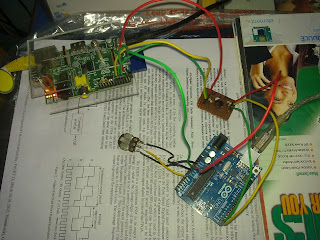
Hi all.. lets do another beautiful DIY... Goal  To read voltage from a potentiometer in real-time and display in a web page dynamically. So.. the goal seems completely dump and does no good job.But the learning curve involved will introduce into many Linux concepts, hardware setup, troubleshooting extents from micro-controller programs to html/php code. Steps 1. Continuously read from analog input of Arduino where potentiometer is connected. 2. Send the value to Raspberry Pi via UART port. 3. Raspberry Pi reads the data and appends and writes it into a file. 4. Make an Apache server run in Raspberry Pi. 5. A combination of simple html file, a php code, and ajax script together does the job of    updating the webpage with latest value from file. 6. Forward the raspberry server to internet and watch the realtime variation of pot value in webpage. Okie.. so lets get started... Hardware Setup.. Yep.. a Raspberry pi and Arduino UNO R3 connected over UART (s...

OpenCL Starter

Hi guys.. Its time to understand some parallel programming. OpenCL seems to be the best candidate in this area. Being its specification fully open and adaptable to different  hardware platforms there is a huge leap towards it.       Parallel programming means taming parallel hardware... Mmm.. offcourse GPUs are the easily accessible parallel things...then comes the FPGAs.. then some mighty DSP processors... and also 32-64 core processing units... etc:.... So OpenCL specification is available for all above platforms. Vendors like Intel, AMD, NVIDIA, Altera, Tilera have already come forward with their SDKs for harnessing parallel beasts... So why don't join the league..  ??? As a user what u can do is to identify a platform cost effective to you.. and start coding.. You are in luck if u have some AMD ATi HD5400 series or above graphic card sitting silently (roaring mostly.. :) ) in your PC and an x86 CPU. What u will need is just some free software packages....

Raspberry Pi GUI over SSH

So what after buying R Pi , the much hyped little supercomputer. You bought it with a huge urge for learning phython and develop some cool devices. But then you realise to setup a programming environment u need a keyboard, a mouse, network, a pricey HDMI display. (I swear any RCA  TV or monitor is too low in quality for an programming geek.)        So now your little but brilliant mind start asking why can't i connect and work R pi to my PC/Laptop.   Who can help you... ?????      Praise linux ... thanks to SSH and X window system .... SSH is a protocol , remote login facility for any linux system from another network device. X window is the aplication which runs a GUI in any linux OS. eg:- it runs LXDE on pi and GNOME on Ubuntu . The best thing about X window is that it is forward-able through  SSH protocol... !!  So what is the setup ??? Ingrediants:   1. A linux/ Windows PC ; which is your ...