Posts

Showing posts with the label Raspberry Pi

Potentiometer to Web
Image
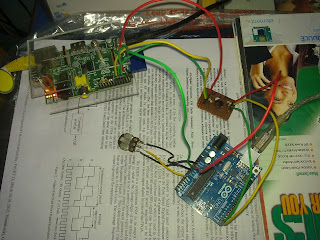
Hi all.. lets do another beautiful DIY... Goal  To read voltage from a potentiometer in real-time and display in a web page dynamically. So.. the goal seems completely dump and does no good job.But the learning curve involved will introduce into many Linux concepts, hardware setup, troubleshooting extents from micro-controller programs to html/php code. Steps 1. Continuously read from analog input of Arduino where potentiometer is connected. 2. Send the value to Raspberry Pi via UART port. 3. Raspberry Pi reads the data and appends and writes it into a file. 4. Make an Apache server run in Raspberry Pi. 5. A combination of simple html file, a php code, and ajax script together does the job of    updating the webpage with latest value from file. 6. Forward the raspberry server to internet and watch the realtime variation of pot value in webpage. Okie.. so lets get started... Hardware Setup.. Yep.. a Raspberry pi and Arduino UNO R3 connected over UART (s...

Bidirectional 3.3v 5v Level Shifter

Image
Hi guys.. welcome to another simple DIY project... Lets make a level shifter, which will just shift a 5v data line to 3.3v or vice versa... Okie why we need such a shifter..  ? or what is this stuff actually.... ? We run around huge bunch of devices that run in various voltage levels.. for example Raspberry Pi runs in 3.3v, and its all GPIO I/O pins are at this level, even though we provide a 5v USB input. And so it is not tolerent to 5V input levels from another device or sensor modules connected to it over I/O pins using SPI, UART, i2C... whatever.... Another example is Arduino UNO which runs in 5V, normally is driving all its I/O at 5V levels.  So interfacing boards at different I/O voltage levels requires a level shifter. Simple voltage divider circuits can help for an extent.. but they dont provide low voltage  device protection or bidirectional shifting. Wait a minute ... Bidirectional... what is it ? Okie.. some communication protocols like i2C are b...

Glow/Dim an LED using Rasp Pi

Image
This is an introduction to PWM generation with Raspberry pi using Python. We all love blinking LEDs. Setting the GPIO pins  high or low to lit or off LED seems so simple. But creating a dim/glow LED requires a little bit info about PWM generation.Simply PWM is all about varying the percentage of duty cycle of a square wave. Duty cycle means the diff between ON time and OFF time in one cycle of a wave. Duty cycle refers to the actual work done time in a single cycle, which is the ON time. We can say a DC signal is '100% ON time wave or has 100% duty-cycle. Paradox : DC signal has 0% OFF time, so we can't call it a wave ... :) Okey... lets start.. Raspberry has particular numbers of GPIO pins which could be used for this experiment. And we would use python to code with...So let us first write the program and discuss the logic... Assuming you are working through SSH to conect to your Pi. And no GUI is available...Login to R pi.. and assuming home folder as working d...

RTL-SDR as source with GNU Radio for WFM reception.

Image
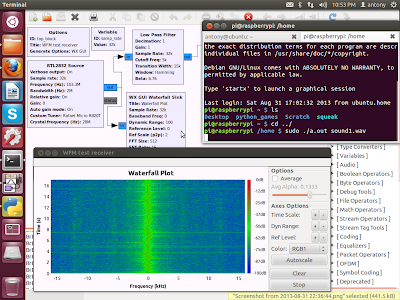
Hi all... This is about using the poor man's SDR dongle ( RTL2832U ) with GNU Radio to receive Commercial FM stations ( Wideband FM stations)... Installation of GNU Radio was a breeze in Ubuntu 12.04 using the build script by Marcus Leech.. thank to him... My core 2 duo machine took 2 hours to build the whole thing... :) Being a total noob in the complex base-band world, i decided to try something for getting familiarized with GNU Radio.. Opened gnuradio-companion.. Tried out some examples. Most of them were based on USRP  SDR Transceiver. But the source block listed the support of RT2832U to be used as a source.. thanks to osmocom . So now i decided to create a WFM receiver in GNU Radio with IQ signals collecting from poor man's receiver. Hooked the SDR dongle.. checked with some similar implementations over internet.. Created a LPF, WFM receive block, GUI Waterfall Sink block, Audio Sink block. Spend a considerable amount of time in understanding all parameters ...

RTL-SDR with Raspberry Pi 'PiFm' project

Image
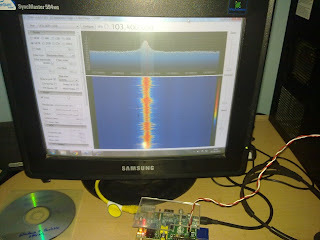
Hi all...        I was totally excited after receiving the RTL-SDR dongle, the poor man's Software Defined Radio Receiver. I hooked it up to see the beautiful spectrum of signals in SDR# software.   And it worked like awesome. The blue waterfall is just awesome.... I wanted to test the device as fast as i could...But since i live in a villlage with no Commercial FM coverage, it semed to difficult to get hold to any strong RF signals.. Still i could get some random energies in 945-960 Mhz GSM band...pretty noisy... digital data.. so not much to be heard to... After some random browsing, i came across a beautiful project to make the Rasp Pi transmit in Wide Band FM mode. The project name is PiFm . It is a nice simple example of SDR transmitter. So without any hardware for FM modulation, a 300 lines C code modulates the DPLL output of Pi's ARM Processor with respect to the digital music data from a wave file. "Kudos to the guys who did it..". The output com...

Raspberry Pi GUI over SSH

So what after buying R Pi , the much hyped little supercomputer. You bought it with a huge urge for learning phython and develop some cool devices. But then you realise to setup a programming environment u need a keyboard, a mouse, network, a pricey HDMI display. (I swear any RCA  TV or monitor is too low in quality for an programming geek.)        So now your little but brilliant mind start asking why can't i connect and work R pi to my PC/Laptop.   Who can help you... ?????      Praise linux ... thanks to SSH and X window system .... SSH is a protocol , remote login facility for any linux system from another network device. X window is the aplication which runs a GUI in any linux OS. eg:- it runs LXDE on pi and GNOME on Ubuntu . The best thing about X window is that it is forward-able through  SSH protocol... !!  So what is the setup ??? Ingrediants:   1. A linux/ Windows PC ; which is your ...

RCA to VGA using FPGA for Raspberry Pi

Hi all.. Shortly received my Raspberry pi... i took my byte... :) I don't have HDMI capable display or an RCA monitor when i received the device.. But the eagerness was so high to think about an RCA video to VGA conversion, since my PC monitor is VGA capable only and was immediately available with me. I have an Altera DE2-115 FPGA board with Cyclone IV FPGA. It is a future perfect development board with a bunch of multimedia capabilities and large I/O options (still lacking HDMI ).       It have a RCA Video In plug. It also have a VGA output connector. So i thought of connecting Rasp pi RCA output to the DE2-115 board. And VGA out of DE2-115 to my PC monitor. The starter CD with DE2-115 have a TV Box Demonstration program. Refer to the DE2-115 User manual  (page 55). Loaded the .mcs file of  TV Box  program to Cyclone FPGA. Connected and powered Raspberry Pi. Voila... The raspberry fruit logo and boot messages started scrolling up.. and finall...